

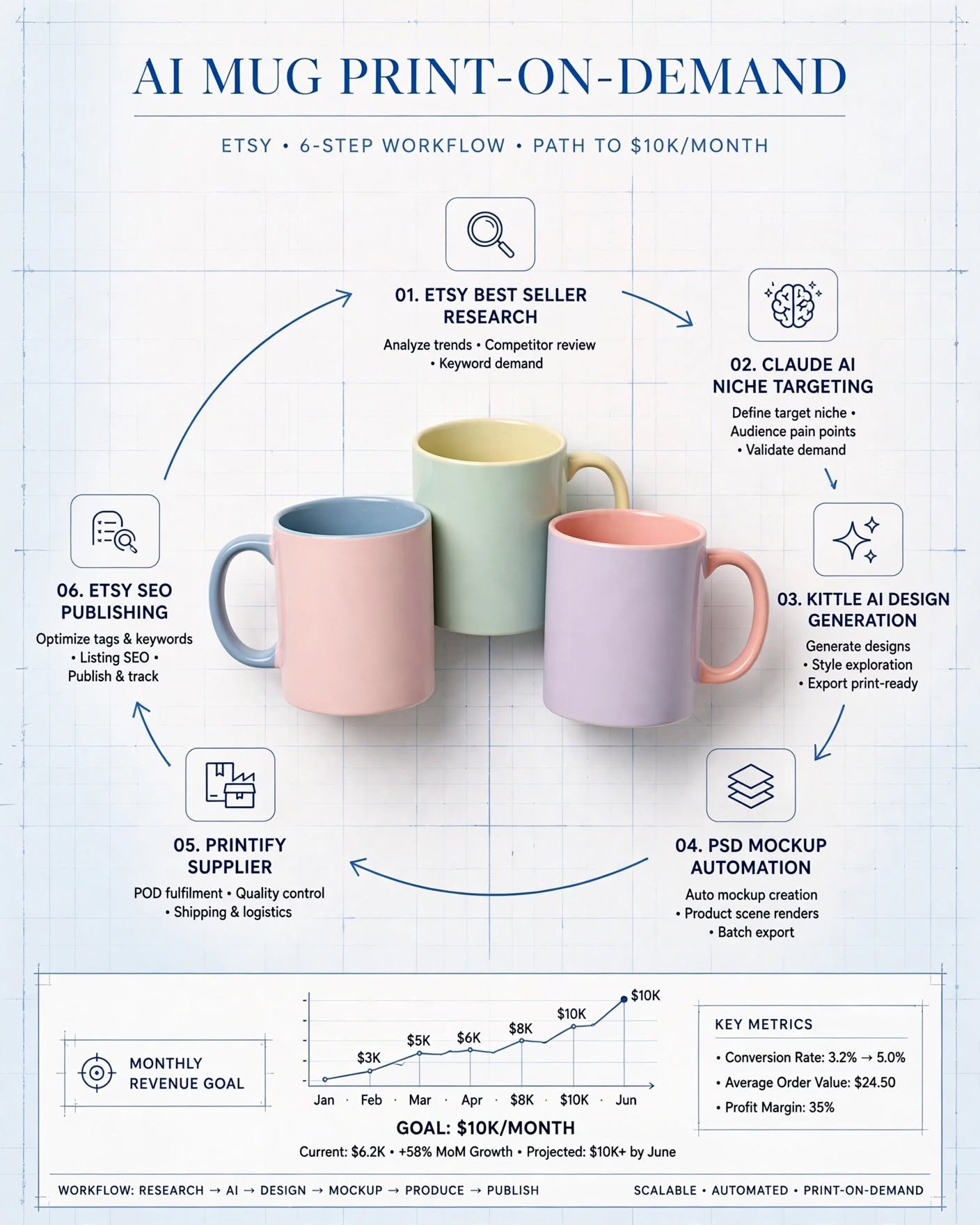
Selling Print on Demand (POD) mugs on Etsy remains a highly lucrative business model. Reaching five figures per month is not about blindly uploading pretty designs; it requires a structured, data-driven workflow—from market research to niche targeting and Etsy SEO optimization.
1. Market Research & Opportunity Identification
The process begins by analyzing bestselling products on Etsy to understand consumer purchasing behavior:
-
Bestseller Search Technique: Go to Etsy and type the generic keyword
"mug"into the search bar. Apply the Star Seller filter, then manually edit the URL by replacing the wordstarwithbest. This forces Etsy to display top-performing and trending products in the category. -
Filtering Products: Focus strictly on POD or dropshipping products with printed designs (ignore handmade ceramics or pottery). Take screenshots of approximately 50 top-selling products.
-
Canva Whiteboard Opportunity Matrix: Import the screenshots into a table on a Canva Whiteboard and add a dedicated column named “Opportunity.” Analyze how to repurpose existing design concepts for different niches. For example, if a bestseller features a Daily Affirmations design, the opportunity is to adapt that exact structure for targeted professions, such as Daily Reminders for Nurses or Daily Affirmations for Teachers.
Core Insight: Etsy shoppers rarely search for generic mugs; they search for specific gifts tailored to professions, hobbies, or special occasions (e.g., “Gifts for Nurses” or “Teacher Graduation Gift”). Effective designs must answer two questions: Who is this for? and Why are they buying it?
2. Targeting Niche Audiences with Claude AI
Once a design concept is chosen, generate a list of target professions using Claude AI with a prompt like:
“Top 50 female jobs in the USA where they would make use of a mug such as desk jobs, nurses etc.”
Targeting professions where mugs are actually useful (e.g., desk jobs, nurses, teachers) ensures higher conversion rates compared to outdoor or non-desk occupations. The generated list serves as the target roadmap for batch production, featuring roles such as Dentist, Teacher, or Librarian.
3. AI Design Generation via Kittl
Set up a workspace in Kittl using a Standard Square Canvas set to 300 DPI.
-
Image Reference: Upload a screenshot of a bestselling design as an image reference to guide the structure and layout (without copying the artwork).
-
Prompt Engineering: Write a prompt instructing the AI to adapt the layout for a specific target audience. For instance, specify a dentist theme, request vibrant pink tones, and incorporate tooth-related graphic elements to outperform the existing market standard.
-
AI Generation Settings:
-
Aspect Ratio:
1:1 -
Number of Generations:
2 -
Background:
Transparent -
AI Model:
GPT Image 2 HD
-
-
Batch Generation: Swap out targeted keywords in the prompt (e.g., changing “Dentist” to “Teacher” or “Librarian”) to quickly generate designs across multiple niches.
-
Exporting Assets: Download all generated files with Remove background enabled at 300 DPI.
4. Realistic Presentation with PSD Mockups & Automation
Product presentation (mockups) directly dictates the Click-Through Rate (CTR) and final purchasing decisions.
-
PSD Smart Object Mockups: Use smart-object PSD mockups purchased from Etsy rather than flat JPEGs or PNGs. Smart objects automatically warp the artwork around the curves and lighting of the mug, creating a realistic, high-end look.
-
Workflow Automation (Quickflow Scripts): Manually placing dozens of designs onto multiple mockups is time-consuming. Using automated batch scripts—which merge files from an Artwork folder with a Mockups folder to generate output assets automatically—saves hours of repetitive work each week.
5. Supplier Integration & Fulfillment via Printify
Connect Printify directly to the Etsy store and select a reliable product base, such as Two-tone Mugs.
-
Artwork Placement: Upload the transparent PNG design onto the canvas, adjust placement, and verify quality using the 3D Preview tool.
-
Variant Selection: Limit variant offerings to match the colors present in the mockup assets (e.g., Black, Red, Yellow, Light Blue, Pink).
-
Pricing & Profit Margins: Set retail prices by working backward from the desired net profit. For example, targeting a minimum profit of $6 per mug will automatically adjust the final retail price accordingly.
-
Publishing Settings: In the Publishing Settings menu, select Hide in store. This sends the product directly to Etsy’s Drafts folder instead of publishing it immediately, allowing for complete SEO optimization before launch.
6. Listing Optimization & Etsy SEO
The final step is optimizing the draft listing on Etsy to maximize search visibility and conversion rates:
-
Visual Asset Upload: Upload the generated PSD mockup suite. Set the most visually compelling variant (e.g., the Pink mug) as the primary thumbnail image.
-
Optimization via Custom SEO GPT: Utilize an AI model trained on search volume data to generate listing metadata based on core seed keywords like
"dentist mug":-
Title: Copy the keyword-rich title into the listing title field.
-
Tags: Populate all 13 Etsy tag slots using research-backed search terms.
-
Description: Paste the structured, persuasive product description into the listing field.
-
-
Item Attributes & Logistics: Fill in item specifications (e.g., Ceramic, 11 oz, Dishwasher Safe, Microwave Safe) and confirm the automatically assigned shipping profile from Printify.
-
Publishing: Preview the completed listing for accuracy and click Publish to make the product live on Etsy.